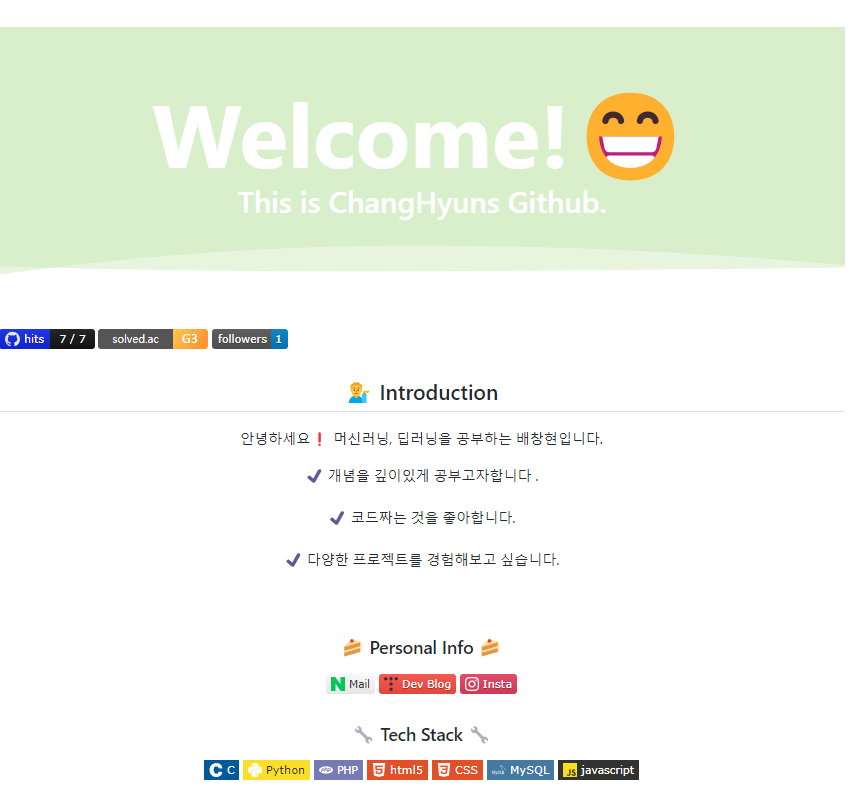
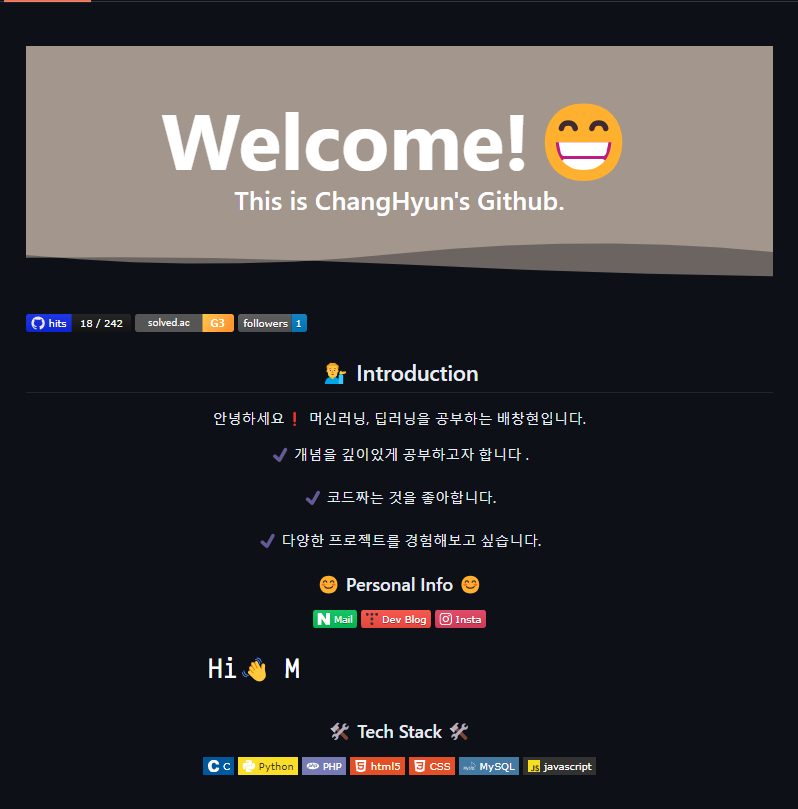
오늘은 자신의 github의 메인화면을 꾸미는 글을 작성해 보겠다.
1. Repository 생성
우선 깃허브에는 특정 이름으로 파일을 만들면 설정되는 몇가지가 있다. 예를 들어 README.md로 만들면 그게 repository 메인으로 뜨게 되고, wiki에서도 Home으로 페이지를 만들면 메인페이지가 되고 이런..
아무튼 그래서 위와 같은 페이지를 만들기 위해서는 자신의 github 사용자명으로 된 repo를 생성하면 된다.
깃허브 페이지 좌측상단에 자신의 이름이 나오는데, 나의 경우는 Bae-ChangHyun이기 때문에 똑같은 이름으로 repo를 생성해 준다. (아래는 공식 github 가이드이다.)
Managing your profile README - GitHub Docs
You can add a README to your GitHub profile to tell other people about yourself.
docs.github.com


2. README.md 생성
그다음 방금 생성한 repository에 README.md를 생성해준다.
3. README 꾸미기
이제 본격적으로 README를 꾸미면된다!!! 여기서 꾸미게 되면 이제 나의 깃허브를 들어오면 해당페이지가 제일 메인에 뜨게 된다.
1. 기술스택 뱃지 만들기(Shields.io / Simple icons / awesome-badges)

위와 같이 자신이 사용하는 기술스택들을 이쁘게 표시할 수 있다!!!
우선 배지의 경우는 아래의 사이트에 들어가서 생성하면 된다.
Static Badge | Shields.io
One of the named logos (bitcoin, dependabot, gitlab, npm, paypal, serverfault, stackexchange, superuser, telegram, travis) or simple-icons. All simple-icons are referenced using icon slugs. You can click the icon title on simple-icons to copy the slug or t
shields.io
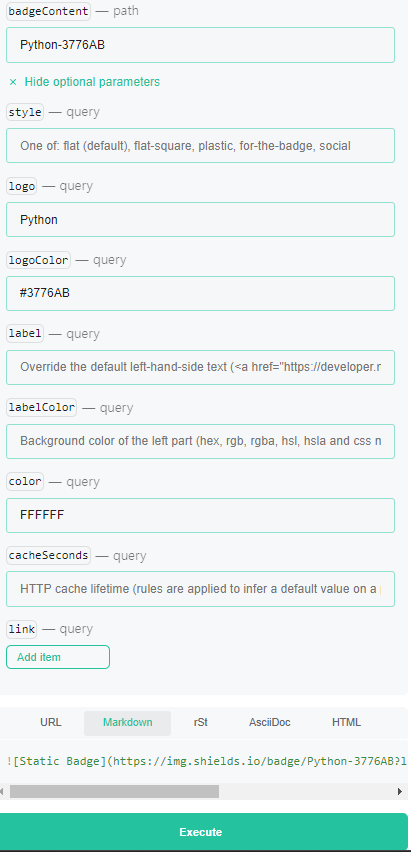
위 사이트에 들어가서 Static Badge를 누르면 이런 화면이 나오는데, 자세한 설명법이 쓰여있다.
우측에 네모칸에 optional parameter도 켜서 상세하게 적어주고 복사하면 된다.
필수로 작성해야하는 것은 제일 첫 번째 badgeContent에는 글씨와-글씨색상(#제외)을 아래 사진처럼 작성해 주고,
logo={simpleicons사이트에서 복사}, logocolor=아이콘색상, color=바탕색상 뭐 이런식으로 설정하면 된다. 밑에 execute를 해보면 먼저 확인할 수 있다.
이후 해당 코드를 복사해서 readme에 붙여넣어주면 된다.
이때 각 기술 스택의 로고나, 배지 색깔 같은 건 아래의 사이트에서 복사해 오면 된다.
로고이름은 로고칸에 마우스를 올려두면 복사된다. 바탕도 마찬가지!
Simple Icons
2770 Free SVG icons for popular brands
simpleicons.org
-> 이렇게 일일이 만들기 귀찮은 분은 아래 repo에 만들어져 있는 몇 개 코드를 복사해서 살짝씩 수정해도 좋을 것 같다~
GitHub - Envoy-VC/awesome-badges: 😎 A curated list of GitHub badges for your next project
😎 A curated list of GitHub badges for your next project - GitHub - Envoy-VC/awesome-badges: 😎 A curated list of GitHub badges for your next project
github.com
2. Capsule render
다음으로는 내 메인페이지에서의 물결모양! 같은 것을 설정하는 방법이다.
우선 공식 repo는 아래에 있는데, 빠르게 사용법만 알아보도록 하자.
GitHub - kyechan99/capsule-render: 🌈 Dynamic Coloful Image Render
🌈 Dynamic Coloful Image Render. Contribute to kyechan99/capsule-render development by creating an account on GitHub.
github.com
우선 README의 제일 첫 번째 줄에 아래 코드를 입력해 준다.
그리고 이제 커스텀은 위의 코드를 조금씩 수정하면 되는데,
아래 보면 20개 정도의 파라미터들이 있다. `type`, `color`,`height`,`section`,`text` 뭐 등등 있다.
공식 repo에 파라미터별로 설명이 너무 상세하게 되어있어서 확인하면 될 것 같다.
(저 위 코드에 없는 파라미터들도 추가하면 된다.)

3. HITS, FORKS 등
다음으로 방문자수와 FORK 카운트 등을 설정할 수 있다.
우선 hist의 경우는 아래 링크에 자신의 target url(repo url)을 적어주면 코드가 나오고 복사만 하면 끝이다!!
세세한 커스텀도 할 수 있으니 이쁘게 꾸미면 된다~
HITS
Easy way to know how many visitors are viewing your Github, Website, Notion.
hits.seeyoufarm.com
다음으로 fork나 follower의 경우는 아까 기술배지 만들 때 이용했던 사이트를 다시 이용할 건데,
GitHub forks | Shields.io
One of the named logos (bitcoin, dependabot, gitlab, npm, paypal, serverfault, stackexchange, superuser, telegram, travis) or simple-icons. All simple-icons are referenced using icon slugs. You can click the icon title on simple-icons to copy the slug or t
shields.io
여기다가 user이름과 해당 repo이름만 적어주면 된다. (링크를 복사하는 게 아니라, 유저이름과 repo이름 이번 글에서는 자신의 main repo를 꾸미는 거니까 둘 다 똑같이 유저이름 적어주면 된다.) - 이것도 역시 커스텀 가능하다
4. 백준 티어
예전에 코딩테스트를 한참 풀 때 해놓은 건데 백준과 연동된 solved.ac의 티어를 띄울 수 있다.
아래에 공식 repo에 다양한 테마들이 존재한다.
GitHub - mazassumnida/mazassumnida: Github 프로필에서 boj 프로필을 이쁘게 보여주는 프로젝트
Github 프로필에서 boj 프로필을 이쁘게 보여주는 프로젝트. Contribute to mazassumnida/mazassumnida development by creating an account on GitHub.
github.com
사용법도 테마별로 코드만 바꿔주고, 자신의 백준 아이디만 파라미터로 넣어주면 된다!!
5. 타이핑 효과
타이핑 효과를 어떤 분은 직접 js로 구현한 뒤 화면에 띄워서 그걸 GIF로 만들어서 GIF를 올리는 분들도 있었는데!!
이것 역시 손쉽게 사용할 수 있도록 구현되어 있는 게 있었다.
공식 깃허브는 아래와 같고, 실제 사용하길 원한다면 두 번째 링크에서 직접 커스텀을 한 다음 마크다운 혹은 HTML 코드를 복사하기만 하면 된다!!! 폰트도 정확한 이름만 적어주면 모두 사용가능하다.!
GitHub - DenverCoder1/readme-typing-svg: ⚡ Dynamically generated, customizable SVG that gives the appearance of typing and del
⚡ Dynamically generated, customizable SVG that gives the appearance of typing and deleting text for use on your profile page, repositories, or website. - GitHub - DenverCoder1/readme-typing-svg: ⚡ ...
github.com
Readme Typing SVG - Demo Site
Loading... Markdown Copy To Clipboard
readme-typing-svg.demolab.com
이것들 외에도 아래에 다양한 오픈소스로 되어있는 것들이 많으니 참고하면 좋을 것 같다!
[github readme stats]
GitHub - anuraghazra/github-readme-stats: :zap: Dynamically generated stats for your github readmes
:zap: Dynamically generated stats for your github readmes - GitHub - anuraghazra/github-readme-stats: :zap: Dynamically generated stats for your github readmes
github.com
[github stats box]
GitHub - bokub/github-stats-box: 📌 Update a gist to contain your GitHub stats
📌 Update a gist to contain your GitHub stats. Contribute to bokub/github-stats-box development by creating an account on GitHub.
github.com
[잔디 시각화]
GitHub - mazassumnida/mazandi: ✅ solved.ac 잔디를 예쁘게 보여주는 프로필 카드 API
✅ solved.ac 잔디를 예쁘게 보여주는 프로필 카드 API. Contribute to mazassumnida/mazandi development by creating an account on GitHub.
github.com
[velog 글 가져오기]
GitHub - eungyeole/velog-readme-stats: Velog 포스트로 Github를 꾸며보자!
Velog 포스트로 Github를 꾸며보자! Contribute to eungyeole/velog-readme-stats development by creating an account on GitHub.
github.com
[Tistory 글 가져오기]
GitHub - loosie/github-readme-tistory-card: github profile readme에 tistory 카드를 올려보자
github profile readme에 tistory 카드를 올려보자. Contribute to loosie/github-readme-tistory-card development by creating an account on GitHub.
github.com
아래는 참고 삼아 제 readme의 코드를 공유합니다!
###
<br>

[](https://solved.ac/matthew624/)
<img alt="GitHub followers" src="https://img.shields.io/github/followers/Bae-ChangHyun">
<div align="center">
<p align="center">
<div align=center>
<h2>💁♂️ Introduction</h2>
<p>안녕하세요❗ 머신러닝, 딥러닝을 공부하는 배창현입니다.</p>
<span>✔ 개념을 깊이있게 공부하고자 합니다 .</span>
<br>
<br>
<span>✔ 코드짜는 것을 좋아합니다.</span>
<br>
<br>
<span>✔ 다양한 프로젝트를 경험해보고 싶습니다.</span>
<br>
</div>
### 😊 Personal Info 😊
<a href="mailto:matthew624@naver.com"><img src="https://img.shields.io/badge/Mail-03C75A?style=flat&logo=naver&logoColor=ffffff&link=mailto%3Amatthew624%40naver.com"/></a>
<a href="https://changsroad.tistory.com/"><img src="https://img.shields.io/badge/Dev%20Blog-333333?style=%20for-the-badge&logo=tistory&logoColor=%23333333&color=%23fc4e42&link=https%3A%2F%2Fchangsroad.tistory.com%2F"/></a>
<a href="https://www.instagram.com/raeps_dlog_/"><img src="https://img.shields.io/badge/Insta-ffffff?style=%20for-the-badge&logo=instagram&logoColor=%23ffffff&color=%23E4405F&link=https%3A%2F%2Fchangsroad.tistory.com%2F"/></a>
[](https://git.io/typing-svg)
### 🛠 Tech Stack 🛠
[]()
[]()
[]()


[]()

</div>
'알쓸신잡' 카테고리의 다른 글
| scikit-learn-intelex (0) | 2023.11.24 |
|---|---|
| git repository 안에 repository 관리 (1) | 2023.11.23 |
| Git pull request 및 협업 (1) | 2023.11.20 |
| Git 기본 명령어 (0) | 2023.11.20 |
| Git commitizen, gitmoji 사용 (1) | 2023.11.20 |